 alt-tabr
100%*
Rust, top to bottom
AppKit through Rust, in one self-contained binary. No Electron, no webview, no bundled frameworks, nothing else to install.
 alt-tabr switches every window.
with notch style app switching, with carousel-like app switching, with Liquid Glass themed app switching, with under 40 MB of RAM usage, with no telemetry, with lifetime updates, with a 30-day money-back guarantee
For macOS 13 or later · Apple silicon & Intel · 30-day money-back guarantee
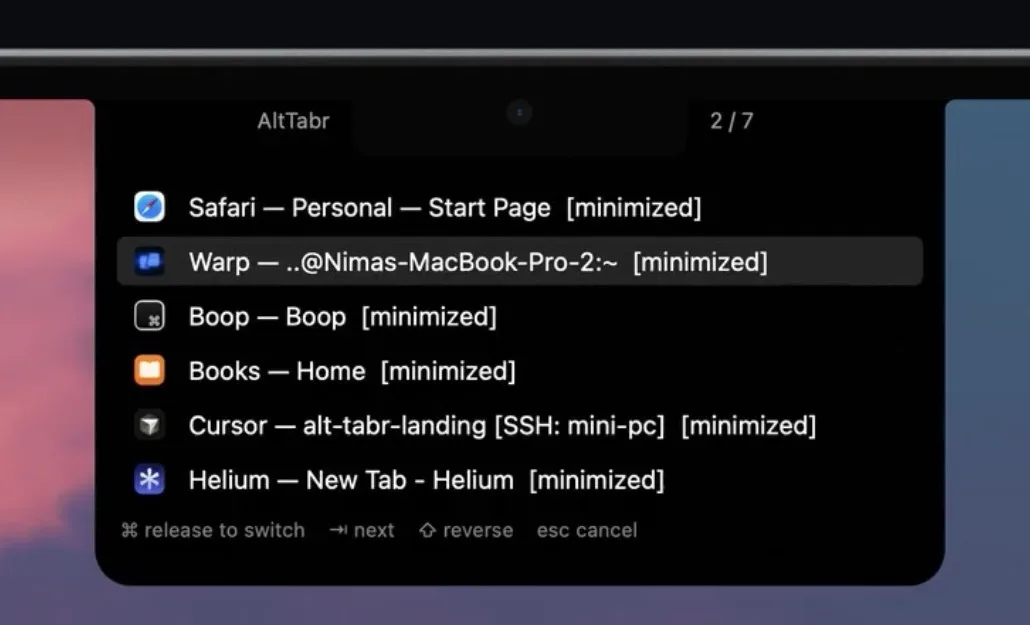
The default theme hangs from the camera notch, its corners flaring into the bezel. Every window gets a row; Tab moves the highlight.
Why replace the built-in ⌘Tab?
With macOS's built-in switcher, switching to an app that is already minimized will show nothing on screen. alt-tabr works on the same ⌘Tab you already use. alt-tabr lists every window and opens up minimized ones too.
100%*
AppKit through Rust, in one self-contained binary. No Electron, no webview, no bundled frameworks, nothing else to install.
1
It reads window titles through Accessibility instead of recording your screen, and it collects nothing about how you use it.
<40MB
No browser engine and no runtime. The window list exists only while you hold the keys.
Average while switching, from the benchmarks below.
7.6× less
No timers and no polling: between shortcuts it isn't scheduled at all. Left idle for 11 minutes, alt-tabr woke the CPU 20 times; AltTab woke it 36,373 times.
About 19% of a full charge saved every year
How much of one full charge each app uses in a year
Both switching windows nonstop for 70 seconds* on the same Mac. Lower is better.
* A keyboard macro recorder replayed the same keystrokes for both apps, so each did exactly the same switching.
Both left idle on the same Mac for 11 minutes. Lower is better.
Each window comes to the front as you Tab past it, so you see exactly where you'll land before you let go. Esc puts everything back.
Off until you turn it on in Settings › Switching
Tidy up without letting go: close the selected window, minimize it, hide its app or quit it. The switcher stays open on the rest.
Off until you turn it on in Settings › Switching
Keep each desktop to itself. The list shows only the windows on the Space you're on, including ones you minimized from it.
Off until you turn it on in Settings › Windows
Fill the screen with the focused window, below the menu bar and clear of the Dock. It stays a normal window instead of going full screen.
Off until you turn it on in Settings › Window Layout
Send the focused window to the left or right half of the screen, in any app, back to macOS 13. Pick Control, Option or Fn if you'd rather.
Off until you turn it on in Settings › Window Layout
Or skip the window: the same options live in one commented JSONC file in ~/.config/alt-tabr, ready for your dotfiles.
alt-tabr Settings
Recently used: the window you used last comes next. By app: each app's windows stay together, apps in recent order.
Skip the switcher on a quick press (on by default)
Press and release the shortcut within 0.15 seconds to go straight to the next window.
Preview window when switching (off by default)
Preview each window as you press Tab. Esc puts them back. Minimized windows open only when you release on them.
Close, minimize, hide or quit from the switcher (off by default)
While the switcher is open: W closes the selected window, M minimizes it, H hides its app, Q quits its app.
Show in the switcher
Only windows on the current display (off by default)
The display with keyboard focus. With one display, nothing changes.
Only windows on the current Space (off by default)
The desktop you are on, including windows minimized from it.
Hide minimized windows (off by default)
Hide windows of hidden apps (off by default)
Apps hidden with Command-H.
Excluded apps
Spotify, com.apple.Music
These apps' windows never appear. Use app names or bundle identifiers, separated by commas.
Automatic uses the built-in notched display for Notch and Carousel, and the display with keyboard focus for Glass.
A list attached to the top of the display, beside the camera notch.
oklch(60% 0.15 135)
Show app icons (off by default)
Mark minimized windows with an icon (off by default)
Hide keyboard hints (off by default)
Hide alt-tabr title (on by default)
App icons beside the camera notch, the selected one on the left.
Show the app title below the notch (off by default)
A Liquid Glass panel in the middle of the focused display.
Show every window at once (off by default)
Wraps onto more rows and shrinks the icons to fit the screen, instead of scrolling a row of seven.
Large icons (off by default)
About the size of macOS's own Command-Tab switcher.
Fill the screen with the focused window (off by default)
Below the menu bar and clear of the Dock. It does not enter full screen.
Move the focused window to the left or right half (off by default)
J moves it to the left half, K to the right.
Control+Option takes nothing from other apps. Control takes text editing keys in text fields and terminals, Option takes typed characters, and Fn+F replaces the macOS full-screen shortcut.
Menu bar
Hide menu bar item (off by default)
To open Settings while it is hidden, open alt-tabr again.
Startup and updates
Start at login (on by default)
Check for updates at launch (on by default)
Once per launch, never in the background.
License
Want a setting that isn't here? Tell us
| Feature | alt-tabr | AltTab Pro | AltTab Free | Built-in ⌘Tab |
|---|---|---|---|---|
| Price | ||||
| Price | $9 once* | From $9.99 | Free | Built in |
| Updates | Lifetime | Lifetime costs $24.99 | Free | With macOS |
| Switching | ||||
| Switches between windows, not just apps | Yes | Yes | Yes | No |
| Lists minimized windows | Yes | Yes | Yes | No |
| Notch and carousel styles | Yes | No | No | No |
| Fill and half-screen shortcuts | macOS 13+ | No | No | macOS 15+ |
| Live window thumbnails | No | Yes | Yes | No |
| Search windows by typing | No | Yes | No | No |
| Privacy and build | ||||
| Permissions it asks for alt-tabr needs only Accessibility. AltTab also asks for Screen Recording. | 1 | 2 | 2 | None |
| Written in | Rust + AppKit | Swift | Swift | — |
| Bundled third-party frameworks | None | Sparkle | Sparkle | None |
| Performance (lower is better) | ||||
| Memory at idle | 12 MB | — | 143.4 MB | — |
| Memory while switching | 27.5 MB | — | 133.4 MB | — |
| CPU wakeups in 11 idle minutes | 20 | — | 36,373 | — |
| Energy in 11 idle minutes | 19 mJ | — | 2,779 mJ | — |
| Energy while switching | 2,235 mJ | — | 3,960 mJ | — |
* Launch price: $9, normally $29.
Performance is from our benchmarks against AltTab Free on the same Mac; AltTab Pro wasn't tested. As of October 2026. AltTab is a separate project; alt-tabr is an independent implementation.
Pay once. Every feature. Yours to keep.
300 launch licenses at $9, then $29
$9
First 300 customers
$29
After that
One license, up to 3 Macs
$9 $29
One-time payment · tax included
Buy alt-tabr · $9Payments handled securely by Dodo Payments No subscription, no account Pay in USD or your local currency License key delivered by email
Love it in 30 days, or it's free. Use alt-tabr for 30 days. If it doesn't make switching windows faster for you, email Nima and get every cent back. No questions, no forms.

Still have a question? Email Nima, who made alt-tabr, at alt-tabr@mohajeri.dev.
A window switcher for Mac.
alt-tabr replaces Command+Tab, or adds Option+Tab, with a switcher that lists every open window instead of every app, minimized windows included.
It's a native app written in Rust for macOS 13 or later on Apple silicon and Intel Macs, sold once for $9 with lifetime updates.
It switches windows, not apps.
macOS's built-in switcher shows apps, so three Safari windows are one entry. Switch to an app whose windows are minimized and they stay in the Dock.
alt-tabr uses the same Command+Tab shortcut, but lists every window, minimized ones included, and opens exactly the one you pick.
Smaller, native and notch-first.
AltTab is free, open source and excellent, with live thumbnails, and AltTab Pro adds search and more styles.
alt-tabr is smaller in scope: one self-contained Rust binary with themes built around the MacBook notch, one permission instead of two, and nothing running while it waits for your shortcut.
Alt+Tab, plus an r for Rust.
On Windows, Alt+Tab switches between every open window, not just apps. That's what the Mac's Command+Tab is missing, and what this app brings over.
The "r" is for Rust, the language alt-tabr is written in.
The language alt-tabr is written in, chosen for speed and reliability.
Rust is a programming language, known for fast, lightweight apps that rarely crash. It catches whole kinds of bugs before the app ever reaches you, the same kinds behind many crashes and security holes elsewhere.
For you, that means an app that opens instantly, stays out of the way, uses little memory and battery, and keeps running without hiccups.
Microsoft, Google and Amazon use Rust in Windows, Android and their cloud services for the same reasons.
Any Mac running macOS 13 or later.
Apple silicon or Intel. There are separate native builds for each, so your Mac runs only code compiled for it.
The Liquid Glass theme uses native glass on macOS 26 and later, and the system's blur before that.
Just Accessibility.
Accessibility lets it list and focus windows. It reads window titles from Accessibility instead of capturing your screen, so it never asks for Screen Recording.
Nothing about how you use it.
There are no analytics and no telemetry. alt-tabr goes online once, at launch, to confirm your license with Dodo Payments and check for updates (which you can turn off).
Otherwise it only connects when you activate a key or click Check for Updates. It keeps working offline.
No. It does nothing until you press the shortcut.
Between shortcuts it sleeps: no polling, no timers, no window scanning. The window list is read when you press the shortcut and thrown away when you let go.
Yes.
Set the shortcut to Option+Tab in Settings and Command+Tab goes back to macOS's app switcher.
Yes, up to 3 with one license key.
Use it on a laptop and a desktop at the same time, for example: enter the same key on each one. There's nothing extra to buy.
Getting a new Mac when all 3 are in use? Click Deactivate This Mac in Settings on the old one to free its slot.
Forgot to deactivate a Mac you no longer have, or erased it first? Email alt-tabr@mohajeri.dev with your license key and the name of that Mac, and ask to deactivate it.
Yes, by email.
Each license key covers up to 3 Macs. If your team or company needs more, email alt-tabr@mohajeri.dev with how many Macs you want to cover, and Nima will sort out bulk licenses for your business.
No.
You pay once and keep the version you bought forever, along with every update after it.
US dollars, or your own.
Checkout opens in US dollars. If you'd rather pay in your own currency, pick it from the currency menu on the checkout page and the price converts at the live exchange rate.
Sales tax and VAT are already included, so the price you see is the price you pay.
Yes, within 30 days.
There's no trial, but there is a 30-day money-back guarantee. If alt-tabr isn't for you, email alt-tabr@mohajeri.dev within 30 days of buying and you'll get a full refund.
$9 once, with lifetime updates and a 30-day money-back guarantee.